EESSI User Guide
Introduction
EESSI (European Environment for Scientific Software Installations) provides a broad collection of scientific software for HPC environments. Software is distributed through CernVM-FS (CVMFS) and made available through the Lmod environment modules system.
The goal is to give users access to modern scientific software without requiring them to install and maintain every dependency themselves.
Across the clusters managed by SCI-uc, EESSI is an additional software source alongside the existing Spack-based software stack and Modules environment.
These clusters therefore provide software from two main sources:
- Software maintained by the SCI-uc technical team and research groups using Spack and Modules.
- Software provided by EESSI through CernVM-FS and Lmod.
Neither platform replaces the other.
What Is EESSI?
EESSI is a software distribution for HPC systems that provides a shared scientific software stack across systems and architectures.
Its goal is to make the same software installation usable across different clusters and systems, reducing the need to maintain separate installations on each infrastructure.
EESSI is organized into three conceptual layers:
- Filesystem layer: Distributes software through CernVM-FS.
- Compatibility layer: Provides compatibility across operating systems and environments.
- Software layer: Provides scientific applications, compilers, libraries, and dependencies.
The node's operating system continues to provide system-level components such as the kernel, drivers, storage and network support, and the cluster resource manager.
What Is CernVM-FS?
CernVM-FS, also known as CVMFS, is the system EESSI uses to distribute software to client nodes.
From a user's perspective, the EESSI repository appears as a read-only filesystem:
/cvmfs/software.eessi.io
Users must not modify this content directly.
When a file is accessed, CVMFS retrieves the required content from the EESSI infrastructure and caches it on the client and on the SCI-uc proxy servers.
Subsequent requests can reuse cached content, reducing traffic to the public EESSI infrastructure.
EESSI Infrastructure at SCI-uc
The SCI-uc EESSI deployment uses two local Squid proxy servers. The architecture is shown below:
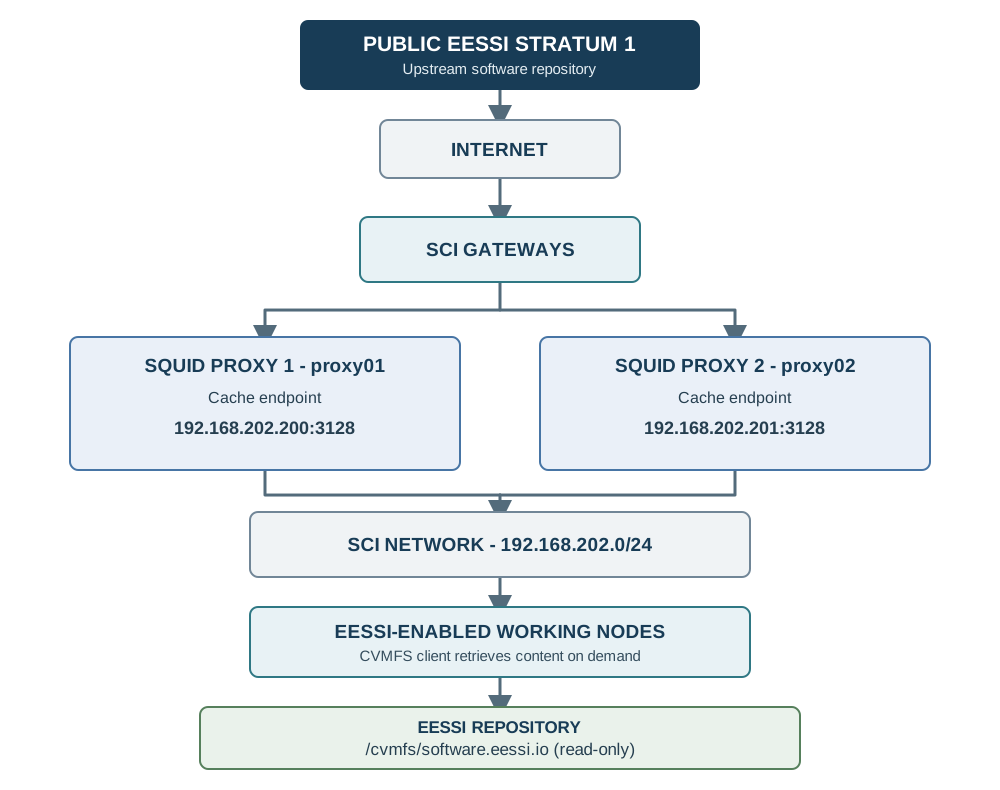
Clients use these proxy endpoints:
192.168.202.200:3128
192.168.202.201:3128
The proxies provide local caching and redundancy.
A private EESSI Stratum 1 has not been deployed at SCI-uc.
Access from Working Nodes
The CernVM-FS client is installed and configured on the SCI-uc working nodes where EESSI is enabled.
Users do not need to install CVMFS or configure the proxies.
Check that the repository is accessible with:
ls /cvmfs/software.eessi.io
The first query may trigger an automatic repository mount and download the required metadata.
Subsequent access is usually faster because the content is cached.
EESSI Version Available at SCI-uc
The EESSI version currently available on the SCI-uc clusters is:
EESSI/2025.06
The main repository is:
/cvmfs/software.eessi.io
The EESSI project maintains the EESSI software stack. The version used by SCI-uc may evolve independently of software versions installed locally through Spack.
Initializing EESSI
From a Bash shell on an EESSI-enabled working node, initialize EESSI with:
source /cvmfs/software.eessi.io/versions/2025.06/init/lmod/bash
This command initializes the Lmod environment provided by EESSI.
Then load the main EESSI environment:
module load EESSI/2025.06
To list the loaded modules, run:
module list
Automatic Architecture Selection
EESSI provides optimized software for different processor families.
When you load the EESSI environment, it automatically detects the CPU architecture supported by the working node. For example, one node may select:
x86_64/intel/cascadelake
while another may select:
x86_64/intel/haswell
or:
x86_64/generic
Users do not need to select an architecture manually or set the EESSI_TARGET variable.
Discovering Available Software
After loading EESSI, use Lmod to browse the available software.
To list available modules, run:
module avail
To search for a specific package, run:
module spider gcc
For example:
module spider Python
or:
module spider OpenMPI
The results depend on the software published in the EESSI version used at SCI-uc.
Loading Software
Load a module with:
module load NOMBRE_DEL_MODULO
For example:
module load GCC/14.3.0
Then verify the installation:
gcc --version
The module automatically adds the required runtime environment and dependencies to your session.
GCC Example
Initialize EESSI:
source /cvmfs/software.eessi.io/versions/2025.06/init/lmod/bash
Load the EESSI environment:
module load EESSI/2025.06
Search for GCC:
module spider GCC
Load GCC:
module load GCC/14.3.0
Verify the compiler:
gcc --version
Create a simple program:
cat > hello.c <<'EOF'
#include <stdio.h>

int main(void)
{
    printf("Hello from EESSI\n");
    return 0;
}
EOF
Compile it:
gcc hello.c -o hello
Run it:
./hello
Python Example
Initialize EESSI:
source /cvmfs/software.eessi.io/versions/2025.06/init/lmod/bash
Load the EESSI environment:
module load EESSI/2025.06
Search for Python:
module spider Python
Load the available Python module:
module load Python
Check the Python version:
python --version
The python command now uses the environment provided by EESSI.
MPI Example
To list the available MPI implementations, run:
module spider MPI
To search for a specific implementation, run:
module spider OpenMPI
After choosing a version, load it:
module load OpenMPI
Verify the installation:
mpirun --version
Module names and versions may change as EESSI is updated.
Using EESSI in Slurm Jobs
EESSI can be used directly from Slurm jobs. For example:
#!/bin/bash

#SBATCH --job-name=eessi-test
#SBATCH --output=eessi-test.out

source /cvmfs/software.eessi.io/versions/2025.06/init/lmod/bash

module load EESSI/2025.06
module load GCC/14.3.0

gcc --version
Using EESSI does not change how you request resources through Slurm. Continue to use:
sbatch
srun
salloc
as you would with locally installed software.
Slurm Job Example with Python
A job script might look like this:
#!/bin/bash

#SBATCH --job-name=python-eessi
#SBATCH --output=python-eessi.out

source /cvmfs/software.eessi.io/versions/2025.06/init/lmod/bash

module load EESSI/2025.06
module load Python

python my_program.py
Submit it with:
sbatch my_job.sh
Using EESSI Alongside SCI-uc Spack Modules
SCI-uc continues to maintain its traditional software stack based on Spack and Modules. EESSI is an additional platform, and users can continue to use SCI-uc modules as usual.
For example:
module avail
lists the modules available in the SCI-uc environment.
Initialize EESSI explicitly with:
source /cvmfs/software.eessi.io/versions/2025.06/init/lmod/bash
Then load the EESSI environment:
module load EESSI/2025.06
EESSI Does Not Replace Local Modules
Software installed and maintained by SCI-uc through Spack remains available. EESSI is an additional software source, particularly useful when:
- the required software is not available locally;
- you need a specific version available in EESSI;
- your application requires a complex set of dependencies;
- you want to use a scientific software stack prepared for HPC;
- you want to avoid maintaining a separate installation.
For software specific to a group or project, the local Spack infrastructure may remain the most appropriate option.
Recommended Workflow
As a general rule:
- First, check whether the required software is available at SCI-uc.
- If it is available and meets your project's needs, use the corresponding local module.
- If it is unavailable or you need a version provided by EESSI, initialize EESSI and search with
module spider. - Do not manually install scientific software on working nodes when a suitable module is available.
This approach helps keep environments reproducible and makes the software easier for SCI-uc to maintain.
Do Not Modify the Contents of /cvmfs
The repository at /cvmfs/software.eessi.io is read-only. Users must not:
- copy software into
/cvmfs; - modify files in the repository;
- install programs directly under
/cvmfs; - use
/cvmfsas a working directory.
Keep user-developed programs in the storage locations provided by SCI-uc.
EESSI and User Data
EESSI provides software, not user data storage. Store data, results, and work files on the storage systems provided by SCI-uc.
Treat /cvmfs/software.eessi.io as a software source only.
Performance and Caching
CernVM-FS uses local caches on working nodes and distributed caching through the SCI-uc Squid proxies.
The first access to some content may require it to be fetched from the EESSI infrastructure. This happens automatically; users do not need to run a separate command.
Subsequent runs can reuse cached content, so the first access to a particular software package may be slower than later accesses.
If a Proxy Becomes Unavailable
SCI-uc provides two proxies:
eessi-proxy01
eessi-proxy02
Clients are configured to use both proxies, so EESSI access does not depend on a single proxy. Users do not need to take action if one proxy is temporarily unavailable.
Troubleshooting EESSI Access
If access to the repository fails, first check:
ls /cvmfs/software.eessi.io
If the problem persists, check the repository status:
cvmfs_config stat -v software.eessi.io
You can also check that the client is configured to use the SCI proxies:
cvmfs_config showconfig software.eessi.io
The output should include:
CVMFS_HTTP_PROXY='http://192.168.202.200:3128|http://192.168.202.201:3128'
Do not modify this configuration. If the problem continues, contact SCI-uc support and include:
- the node you used;
- the command you ran;
- the EESSI module you loaded;
- the error message;
- the output of
cvmfs_config stat -v software.eessi.io.
Building Your Own Software with EESSI
EESSI primarily provides general-purpose scientific software and its dependencies. If you need to build your own software, you can use the compilers and libraries provided by EESSI. For example:
source /cvmfs/software.eessi.io/versions/2025.06/init/lmod/bash
module load EESSI/2025.06
module load GCC/14.3.0
You can then compile your code in your usual working directory. Do not build or install software under:
/cvmfs/software.eessi.io
EESSI and GPUs
Where compatible builds are available, EESSI selects software based on the characteristics of the system.
System-specific components, including GPU drivers, remain the responsibility of the operating system and the SCI-uc infrastructure.
The availability of GPU-optimized software depends on the EESSI version and the packages it provides.
EESSI Updates
EESSI is versioned. The SCI-uc technical team selects which EESSI versions are made available to users.
The currently available version is:
EESSI/2025.06
New versions may be made available alongside older versions during a transition period. Consult the SCI-uc documentation for the versions currently enabled on the cluster.
Official EESSI Documentation
The official EESSI documentation provides detailed information about the architecture, available software, and environment setup. Topics include:
- EESSI - Project overview
- EESSI - Filesystem layer
- EESSI - Software layer
- EESSI - Setting up the environment
- EESSI - Native installation
- EESSI Extend
- EESSI - Infrastructure status
See the official documentation at:
Official CernVM-FS Documentation
CernVM-FS is the technology EESSI uses to distribute software. Its documentation covers:
- architecture;
- clients;
- caches;
- Squid proxies;
- configuration;
- autofs;
- troubleshooting.
See:
Quick Reference
To use EESSI from a working node, initialize the environment and list the available modules:
source /cvmfs/software.eessi.io/versions/2025.06/init/lmod/bash

module load EESSI/2025.06

module avail
Search for a package:
module spider PACKAGE
Load a module:
module load PACKAGE/VERSION
Check the environment:
module list
Run the program:
PROGRAM_NAME
Contact and Support
Report issues with the SCI-uc EESSI/CernVM-FS infrastructure to the technical team through either official support channel:
When reporting an issue, include:
- the node name;
- the command you ran;
- the EESSI version;
- the module or software involved;
- the error message;
- relevant details about the Slurm job.
References
- European Environment for Scientific Software Installations (EESSI).
- CernVM-FS.
- SCI technical documentation.
- SCI-uc software infrastructure based on Spack and Modules.