Software Management at SCI-uc
The SCI-uc Advanced Computing Service provides infrastructure services across multiple HPC and HTC clusters. It supports two operating models: Hosting, using equipment owned and operated by SCI-uc, and Housing, using equipment owned by research groups. In Housing, operations depend on the modality: SCI-uc manages Type A equipment, while the group independently manages Type B equipment. Further information about these models is available on the SCI-uc website.
Software management is provided through two complementary sources on the working nodes where each is available: software managed with Spack and Modules, and the EESSI (European Environment for Scientific Software Installations) software stack. Spack + Modules supports both centrally managed software maintained by the SCI-uc technical team for all groups and users, and the compilation, installation, and deployment of software specific to research groups or individual users.
Infrastructure Service Models
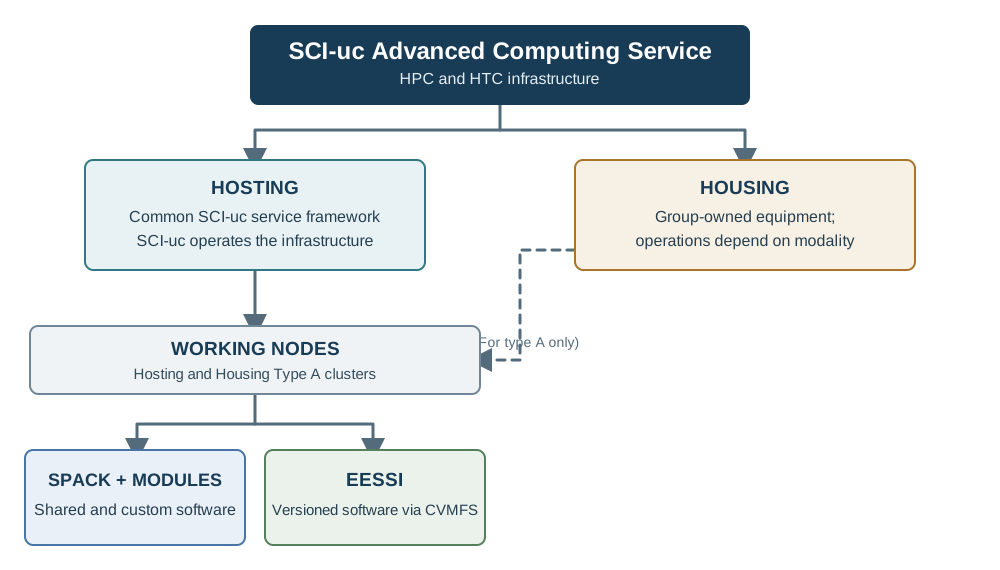
Hosting and Housing distinguish equipment ownership and service arrangements; Housing operations depend on the selected modality. Type A Housing equipment is operated by SCI-uc and can be integrated into its working-node services, while Type B remains independently managed by the group. On working nodes, the available software sources are Spack + Modules, EESSI, or both, depending on the cluster and deployment. Neither source replaces the other. Use the guidance below to identify the appropriate source and workflow.
Software Sources
| Source | How software is provided | Typical use |
|---|---|---|
| Spack + Modules | Software installed by the SCI-uc technical team, research groups, or users and exposed through modulefiles. | Shared software provided to all users, as well as group- or user-specific applications and custom builds. |
| EESSI | A versioned software stack distributed through CernVM-FS and exposed through Lmod. | Accessing the scientific software and dependencies published by EESSI without maintaining a separate installation. |
Spack + Modules
Spack installs software and manages versions, compilers, and dependencies. Modulefiles provide a consistent way to discover and load installed software without manually editing environment variables. The SCI-uc technical team maintains common software and makes it available to all groups and users. In addition, research groups and users can use Spack to compile, install, and deploy software for their own requirements, typically using group-specific Spack environments and modulefiles.
Use the guide that matches your task:
- Browse available HPC software and modules: module commands and software currently provided by SCI-uc.
- Build custom software with Spack: A step-by-step guide for compiling, installing, and deploying custom software is planned.
- Build MPI application swith Spack: build and verify MPI applications with the OpenMPI modules available on the target partition.
- Build a custom OpenMPI with Spack: create a group-shared or personal Spack environment and build OpenMPI for the target architecture and network.
For group installations, a shared Spack environment may be available at /nfs/software/$GROUP/spack. The typical workflow is to activate the environment, install the required package, and generate modulefiles so users can load the software. For a worked example, see the SIESTA installation with Spack tutorial.
EESSI (European Environment for Scientific Software Installations)
EESSI provides a versioned collection of scientific software through the read-only repository at /cvmfs/software.eessi.io. On working nodes where EESSI is enabled, users initialize its Lmod environment and load software modules; they do not need to install CVMFS or configure the SCI-uc proxies themselves.
See the EESSI User Guide for setup, module usage, Slurm examples, and troubleshooting.
Shared Storage
Software and data use two different storage mechanisms: shared NFS filesystems for Spack + Modules installations and user/project data, and the read-only CVMFS repository used to distribute EESSI software. EESSI is not a storage location for user or project data.
Spack + Modules storage
Network filesystems are available from user-interface and working nodes under /nfs. They support home directories, shared project data, and software installations:
| Path | Purpose |
|---|---|
/nfs/home/$USER/ |
User home directories. |
/nfs/shared/ |
Data shared across projects and groups. |
/nfs/software/sci/ |
Common software maintained for use across groups. |
/nfs/software/$GROUP/ |
Group-managed software, libraries, and Spack environments. |
When installing software with Spack, prefer a self-contained environment with the required dependencies. This helps limit conflicts with system updates and improves reproducibility. Groups should install their software under /nfs/software/$GROUP/ and reuse common packages from /nfs/software/sci/ where appropriate.
EESSI storage (CVMFS)
EESSI software is distributed through the read-only repository at /cvmfs/software.eessi.io. The version currently documented for SCI-uc is EESSI/2025.06; on working nodes where EESSI is enabled, users access its software through Lmod modules.
CVMFS retrieves repository content on demand and caches it on working nodes and through the SCI-uc Squid proxies. This reduces repeated downloads. Users must not modify the repository or use it to store their own software or data.
For initialization, module usage, and troubleshooting, see the EESSI User Guide.